
Core concepts
Daily briefing
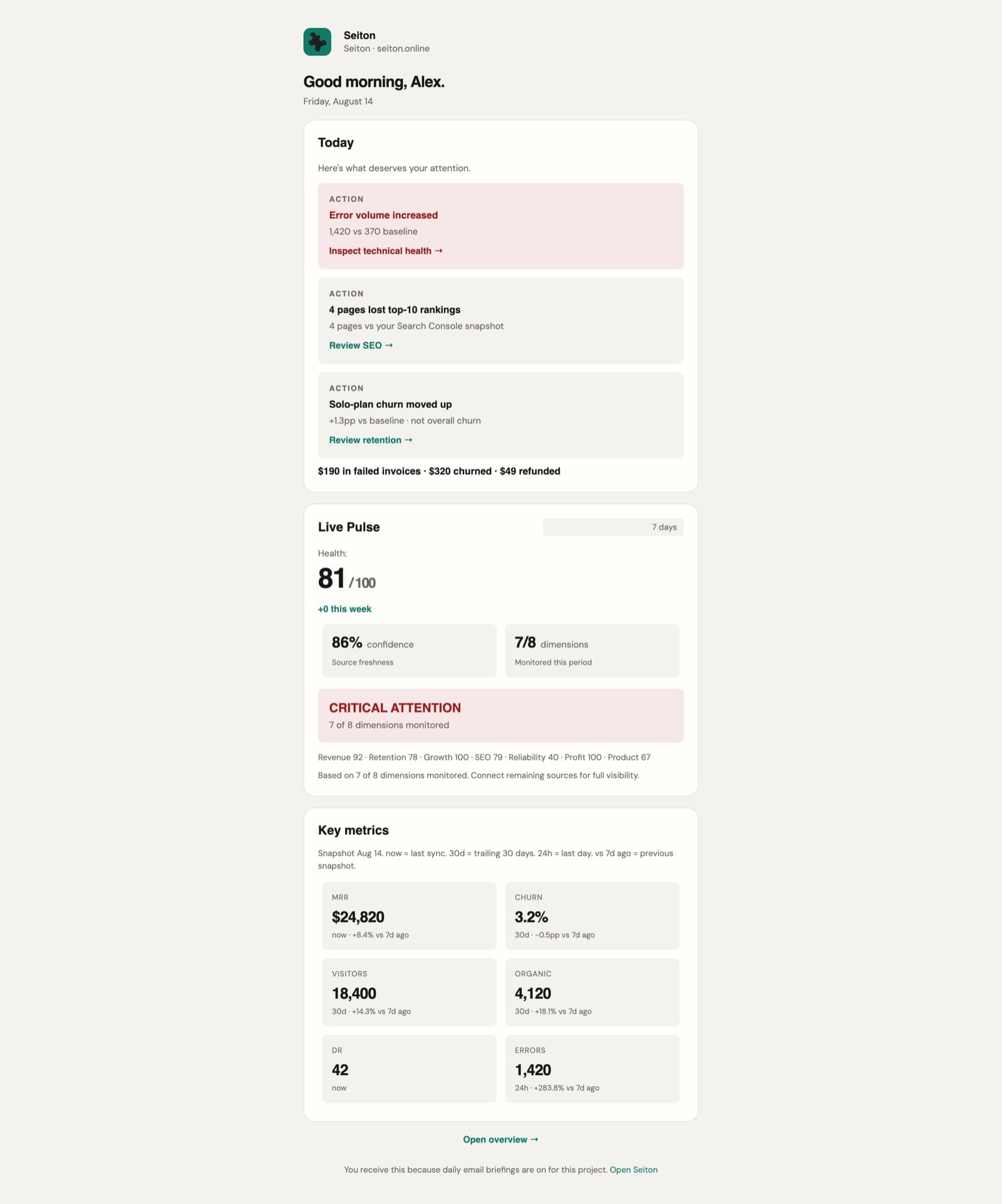
One message per project per day, at 08:30 local. It leads with the decision, then shows the diagnosis, then the numbers — the same order as the dashboard, so nothing has to be reconciled between them.
What is in it
Four blocks, always in this order.
| Block | Contents |
|---|---|
| Today | The items worth acting on, each with its severity, the evidence behind it and a link straight to the page that resolves it. On a quiet day it says nothing needs attention and lists what is merely worth knowing. |
| Money line | Failed invoices, churned MRR and refunds for the day — the sentence most founders read first. |
| Live Pulse | The composite score, the weekly trend, confidence, and the per-dimension scores across the 8 dimensions. |
| Key metrics | MRR, churn, visitors, organic clicks, domain rating and errors, each with its window and its delta against the previous snapshot. |
When it is sent
08:30 local, in the project's own timezone — not yours, not the server's. The scheduler ticks every hour and each project is delivered on the tick that matches its own clock.
- The delivery time is per project and editable in Project settings → Reports.
- A 20-hour cooldown per channel makes a duplicate briefing impossible even if the scheduler fires twice.
- A project that has never synced still gets a briefing — it says it is awaiting data rather than reporting zeros.
Choosing recipients
Project settings → Reports owns the email briefing. Slack, Discord and webhooks live one panel over, under Alerts.
- 1Open Project settings → Reports.
- 2Add up to ten recipients, one per line. They do not need Seiton accounts.
- 3Set the delivery time, and save.
- 4Press Send briefing now to email today's briefing immediately — the fastest way to see what tomorrow morning will look like.
Delivery is logged
The Reports panel lists recent sends with their status and any provider error, so a missing briefing is a question you can answer without opening a support thread.
Reading it somewhere else
The briefing is also a first-class API resource. Agents and scripts can fetch exactly what was sent: GET /api/v1/projects/<id>/briefing with a scoped sei_ token, seiton briefing from the CLI, or the same tool over MCP. See API, CLI & MCP.
Something here wrong or missing? hello@seiton.online